After the Session: Submission & Records
Submitting to SANDARC
SANDARC Policy
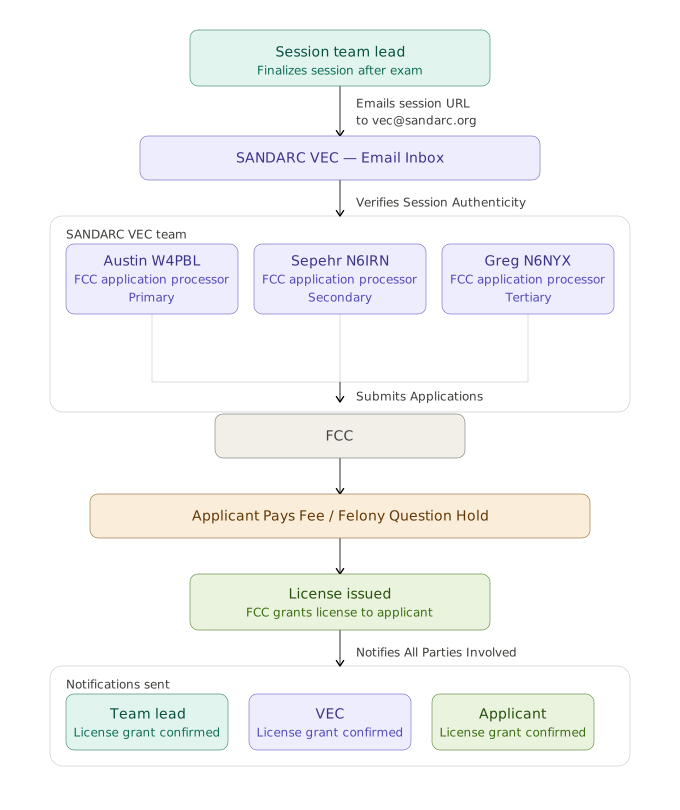
- Submit the VEC Archive file generated by ExamTools to vec@sandarc.org as soon as possible after the session concludes.
- Include any supporting documents (e.g., element credit evidence) in the same email.
- If you encounter any issues with ExamTools or submission, contact vec@sandarc.org or call (619) 215-1886 immediately but for the fastest response you should use the SANDARC Discord.
- The FCC requires session records to be retained by the VEC for at least 15 months. [§97.519(b)(3)] SANDARC retains submitted session records accordingly.
- Teams must retain their own copies of session documents until SANDARC confirms the session has been received and processed. If session records are lost, retained copies allow the session to be reconstructed without applicants having to retest.
What to Send
- VEC Archive file from ExamTools (required for all sessions) (DO NOT OPEN THE ARCHIVE ONCE DOWNLOADED)
- Copies of any element credit documents reviewed at the session (expired license copies, prior CSCEs)
- Notes on any scoring overrides or unusual circumstances
Send the archive exactly as downloaded
Attach the VEC Archive file to your email straight from your downloads folder. Do not open, unzip, rename, or re-save it. Some browsers and operating systems will alter an archive simply by expanding it, and an altered archive may not process.
After completing the session in ExamTools, the Team Lead should:
- Click "Finish Session" in ExamTools to finalize all paperwork.
- Download the VEC Archive file.
- Email the VEC Archive file and any supporting documents to vec@sandarc.org within 24 hours of the session conclusion.
- Sit back, relax and enjoy the services of The Coolest VEC!
Session Submission Process